
The company, people, production issue, and parameter values in this walkthrough are illustrative. The screenshots show the real Summit app using demonstration data. These are not recommended or validated molding settings, and no production results or savings are claimed.
Keeping the approved setup clear between shifts
A setup sheet connects a molding job with the settings a team has approved for it. A binder, shared spreadsheet, or PDF can hold that information, including revision tabs and sign-off records. Keeping the master copy current, restricting edits, and making sure each shift finds the right revision still require a dependable process.
Consider a first-shift operator who notices a possible short fill and wants engineering to evaluate a setting change. The immediate questions are practical: which press and product are affected, what is approved now, what is being proposed, and who needs to review it?
Wayah Summit organizes this information in manufacturing Recipes. In this article, “setup sheet” means a Recipe for a machine and product, with typed parameter values and a version history. Summit manages the information and approval workflow. It does not connect to the press, read live process data, or apply settings to machinery.
1. Start with an approved setup for Press 4
The demonstration company is Wayah Demo — Injection Molding. Its plant has two presses and two products: Press 4 runs the Junction Box Cover, and Press 7 runs the Cable Clip. Each combination has its own Recipe. An approved setup for one machine is not assumed to transfer to another.
The walkthrough follows Press 4 and the Junction Box Cover from Version 1 to Version 2. Version 1 contains four demonstration parameters: barrel zone 3 temperature at 410 °F, hold pressure at 950 psi, cooling time at 12 seconds, and a text reference to mold MOLD-JBC-100-A. The parameter definitions and units give each value a consistent meaning. The mold ID is an ordinary text parameter, not a dedicated tooling-management record.
Three separate test actors represent the operator, process engineer, and final approver. They retain their existing test-account identities in the screenshots; they are not named customer employees.
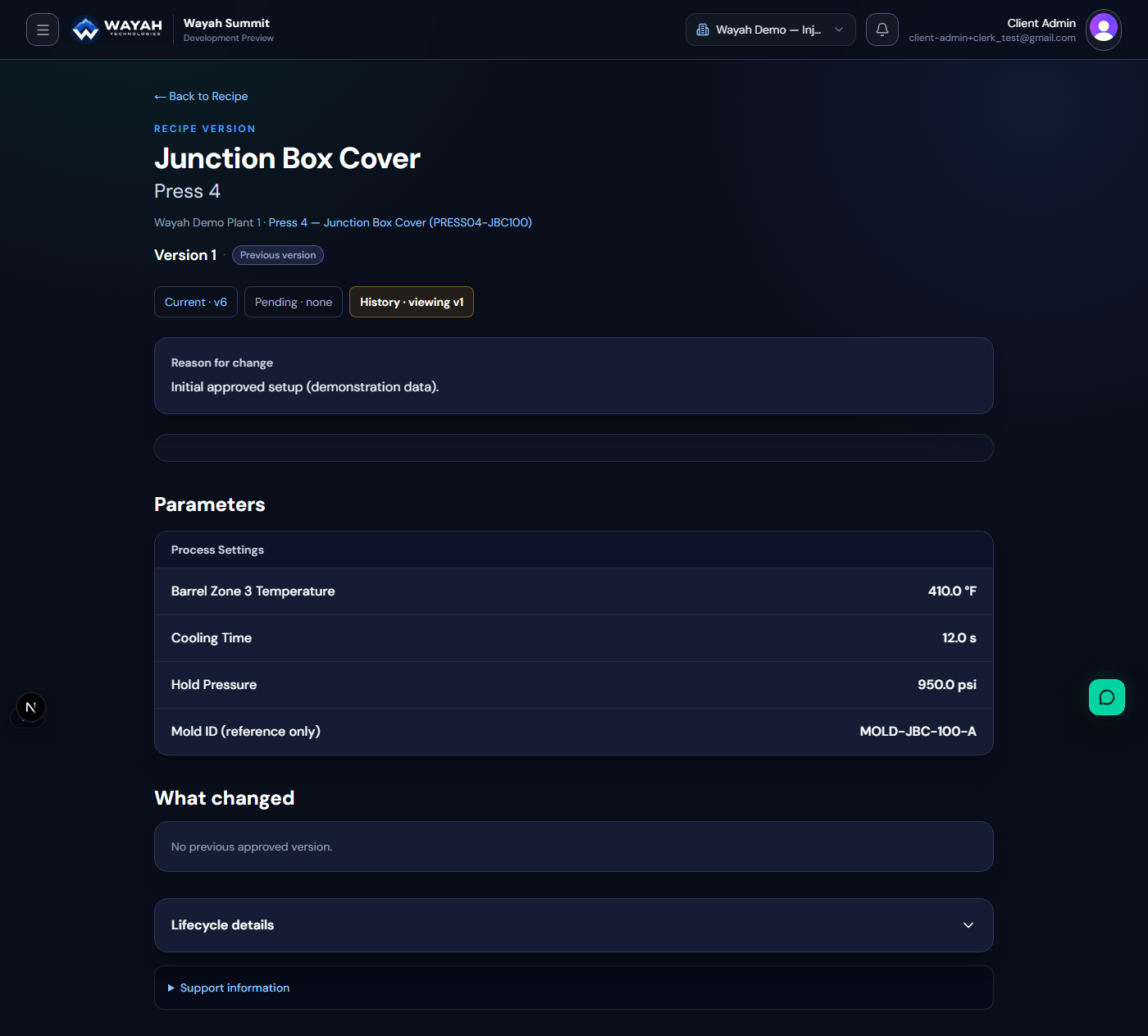
2. Record the issue and proposed change
The operator records a suspected short fill at the gate and asks engineering to review a trial increase in hold pressure from 950 to 1,050 psi. The reason explicitly says the trial has not yet run on the floor. That proposed value is a hypothesis for evaluation, not a diagnosis or a processing recommendation.
Through the Current Recipe’s “Propose a change” flow, the operator identifies the requested parameter change and submits the request. The pending proposal does not overwrite the approved setup. This is the first useful separation in manufacturing change control: recording a proposal is different from authorizing a new standard.
3. Review the request, then create a Draft
The engineer reviews the request, its reason, and the requested value. Any real process evaluation belongs under the plant’s own engineering and quality procedures, outside this demonstration. Summit records the decision; it does not establish that a proposed molding setting is safe or effective.
Approving the request still leaves the Current Recipe unchanged. In the recorded demo, the Current Recipe was read again immediately after request approval, and all four values remained the same.
The engineer then takes a separate action: Create Draft from request. That action copies the base version and applies the requested change. The resulting Draft contains 1,050 psi hold pressure; the temperature, cooling time, and mold reference carry over unchanged. A request with a created Draft is not evidence that the new Recipe Version has passed its own approval.
4. Submit and approve the complete version
The engineer checks the Draft and submits it for approval. A different authorized test actor, the Client Administrator, approves the version in this example. The team reviews a complete configuration, rather than treating acceptance of one requested number as approval of the whole setup.
Version 2 then becomes Current, and Version 1 becomes Superseded. The original values remain available. This Recipe version-control lifecycle keeps the proposal, implementation, and final approval as distinct steps.
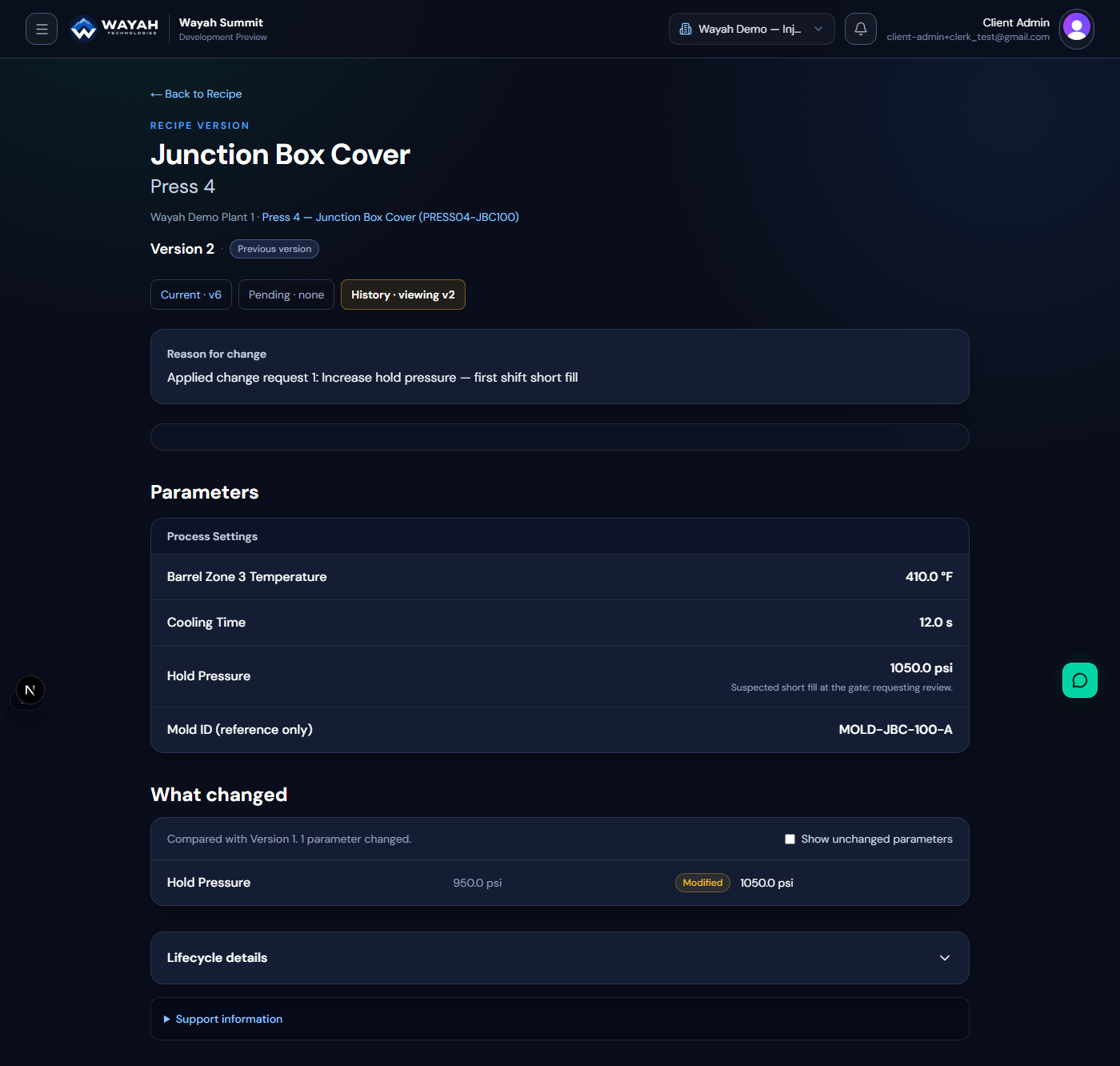
5. Use the Current Recipe at the work center
Approval does not send anything to the press. Before the next run, a setup technician can open the Current Recipe on a tablet or workstation, confirm the machine and product, and enter or verify the values under the plant’s changeover procedure. A printed copy is optional; the workflow can remain electronic.
The important distinction is between an approved record and machine execution. Summit’s history identifies which setup was approved. Confirming what the press actually ran requires the plant’s own checks or monitoring.
6. Keep the earlier versions available
The demo continued beyond the first request. Press 4 reached Version 6, and Press 7 reached Version 5. Additional examples included a rejected request, a withdrawn request, and a request returned for revision before approval. A further cooling-time proposal was left pending for the review queue.
The history matrix lets a reviewer follow individual parameters across versions. The version list retains approval context and change reasons. The screenshots were captured after these additional examples, which is why Versions 1 and 2 are marked as previous versions. They still show the original baseline and the first approved change accurately.
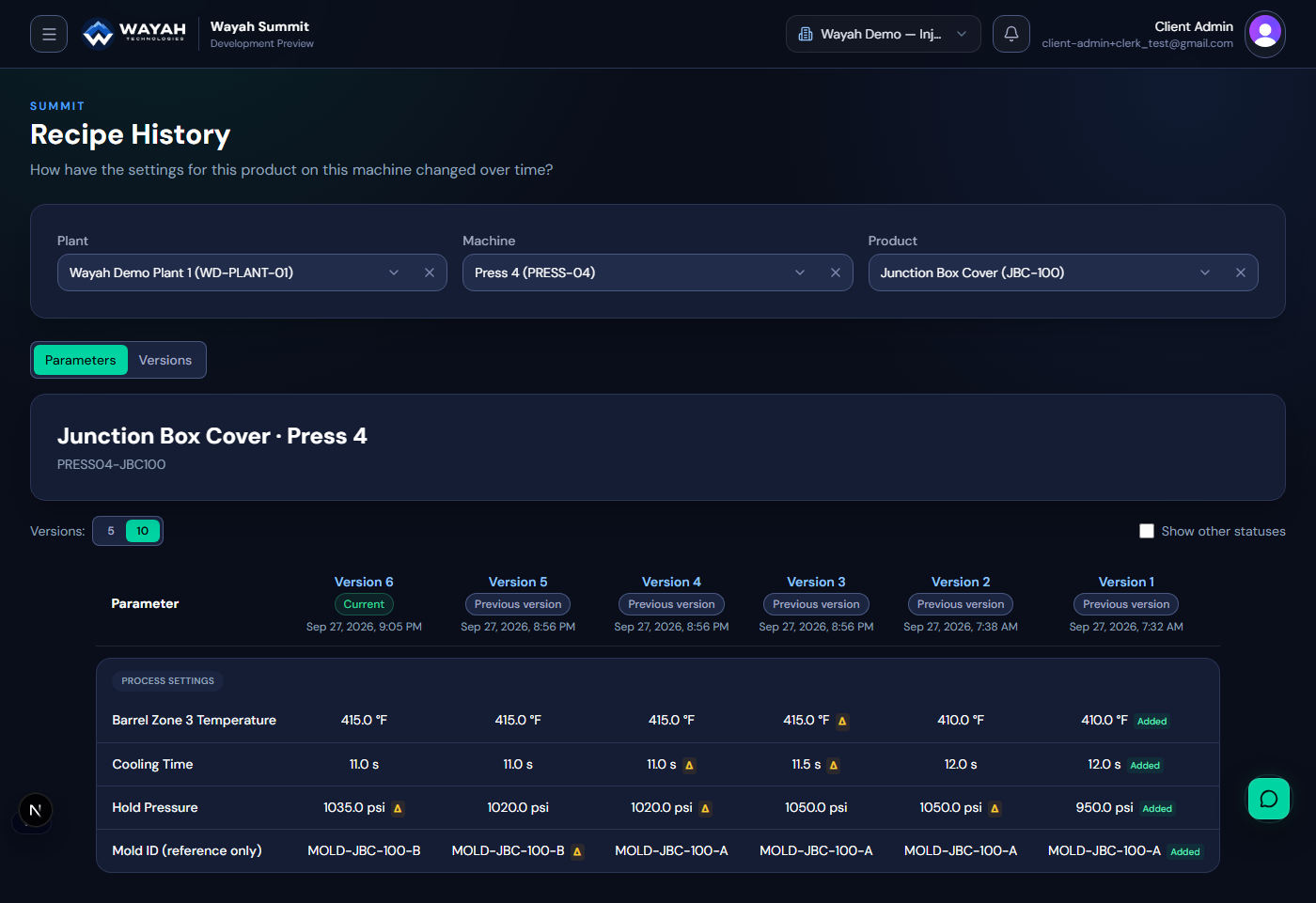
These events were created for a demonstration within one day. The history is an actual record of those test workflows, not a fabricated production timeline or evidence of scrap reduction.
Try the workflow with your own setup sheets
Choose one machine, one product, and one proposed change. Ask whether your team can identify the approved baseline, distinguish a request from an approved version, and retrieve the replaced setup without reconstructing the decision from messages. The Recipe Control Checklist offers a broader assessment.
Start your 30-day free trial
Explore Wayah Summit with a 30-day free trial. No credit card required. Create an account, then create your organization to start the trial.
Prefer a guided walkthrough? Request a demo with our team.
Start your free 30-day trialRequest a demo